User Interface & Available Commands / Isolation Commands | Send comments on this topic |
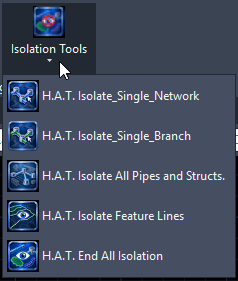
Commands (USE IN MODEL SPACE ONLY!):
These commands may prove useful when setting up your network initially or simply to visualize elements more easily.
ØExample work flow: Isolate a single network, assign the correct manning's coefficient, material, reference alignment, or reference surface. Then "Unisolate All" to get back to your previous view.
1. OL_IsolateSingleNetwork
ØIsolate all pipes/structures within a network by selecting any pipe or structure
2. OL_IsolateSingleBranch
ØIsolates only the pipes/structures connected to the selected pipe or structure selected.
3. OL_Isolate_All_Pipes_Structures
ØIsolates all visible pipes and structures (including catchments) currently visible in Model Space regardless of the network they belong to.
4. OL_IsolateFeatureLines
Ø Isolates all feature lines visible in Model Space. Yes, we really just threw this in there in case it is usable for your work flow.
5. OL_End_Isolation
ØRestores view to previous view --> no objects isolated
ØWorks whether the isolation was a result of H.A.T. isolation command or native isolation command.
Copyright © 2026 CivilFX, LLC