User Interface & Available Commands / Extra Editing Tools | Send comments on this topic |
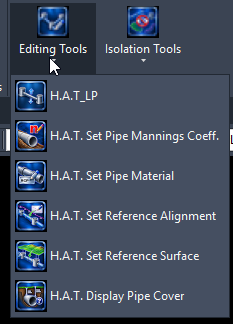
Commands (Batch selection or single object selection):
1. OL_LP
ØRaises or lowers the selected pipes by specified amount.
2. OL_SetPipeMannings
ØSets the Manning's coefficient value for all selected pipes.
ØEnter the value in the command line and select all pipes to be updated.
3. OL_SetPipeMaterial
ØSets/overrides the material description text to provided value. Does not work if the associated parts list has this property set as "read-only"
4. OL_SetPipe_Struct_Alignment
ØSets the Reference alignment for all the selected pipes.
ØSelect the alignment from a list or select the alignment in plan view, then select all pipes to reference the selected alignment
5. OL_SetPipe_Struct_Surface
ØSets the Reference Surface for all selected pipes and/or structures.
ØSelect the surface from a list, then select all pipes or structures to be updated.
6. OL_DisplayPipeCover
ØSimple command to display the pipes Min/Max cover instead of opening the pipe's properties dialog
Copyright © 2026 CivilFX, LLC