User Interface & Available Commands / Companion Editing Tools / Pipe 2 Pipe Editor | Send comments on this topic |
Command: "OL_PPS"

This command allows editing of complete runs by setting a few basic parameters and then selecting the pipes in plan or profile view. Since it is meant to be mostly a "visual" tool, it is suggested that the command be tested using profile view to become familiar with behavior, but this is only a suggestion.
ØRun the command
ØSelect the "Options" keyword. You do not have to do this every time command is run unless you wish to use different options.
ØIf you have dynamic input enabled.
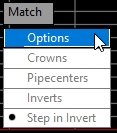
ØOr for the command line version:

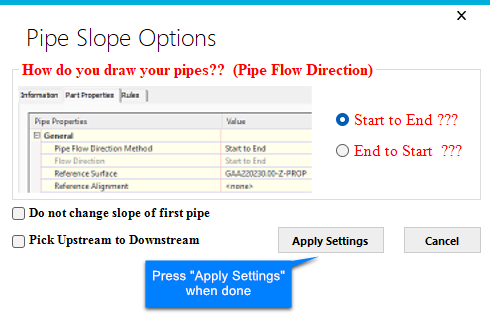
 Important: Selecting the flow direction option is crucial, because you pick the pipes in order. Also, when specifying the slope, it is possible to use a negative slope depending on direction. Give it a go!
In the example below, the pipes are drawn "Start to End" in the upstream to downstream direction. Therefore, the selection is made by selecting pipes downstream to upstream, unless you select the "Pick Upstream to Downstream" option. You would obtain the same results selecting the pipes in "plan" view instead of profile view, it is just easier to see in profile.
In case the video is hard to see:
Selected to match "Crowns"
Entered Slope: 10 (positive)
Selection Order: downstream to upstream
When is the option "Do not change the slope of first pipe" handy?
ØWhen you are trying to match the crown, invert, or center of the first pipe, without changing it's slope.
ØSee example below:
Copyright © 2026 CivilFX, LLC