User Interface & Available Commands / Diagnostics Commands / Compare Results with Storm Sewers | Send comments on this topic |
Command: "OL_BRANCH_DIAG"

This will allow direct comparison of some of the output values obtained from an .stm, .csv, or .txt file of the equivalent branch/network results produced by Civil 3D Storm Sewers®. This feature is available to provide full transparency in the calculated values produced by H.A.T. but does NOT check the accuracy of any analysis done with Storm Sewers or any other external software.
Why only "some" of the values can be compared?
Ø.stm files do not provide full output parameters
▪When opening an .stm file, the H.A.T. compare algorithm provides a "raw" text file with the extracted information.
▪Look at the command line for location of this text file, which is the same location as the .stm file.
▪Example message:
•"Raw data file created for debugging: C:\Folder\Folder\ProjectNumber\Stormwater\Phase 1\2026-07-27 Test\Line J Branch_20261109.txt"
•This raw text file will allow you to see the information that can be extracted, which may be a severely outdated file.
Ø.csv or .txt file output from Storm Sewers depends on what "Report" type was selected for the export.
ØKnown issues:
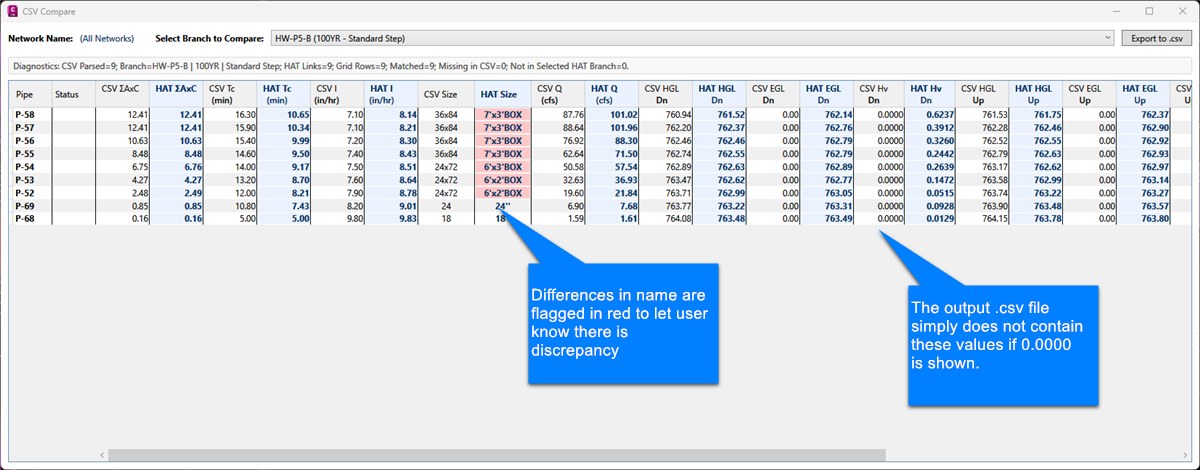
▪If the Storm Sewers Analysis was performed before a change in network name, you will see a blank comparison window. Differences in network names hinder/prevent the comparison. This affects the comparison when using an .stm file.
▪sing an exported .csv or .txt instead will bypass the network name issue, but depending on the type of exported report, may not contain all the compare data.
▪There are documented / known issues with Storm Sewers not calculating the system Time of concentration correctly when a pipe is NOT pressurized or has very little flow, producing "longer" system Tc's, which in turn, underestimates the flows.
Below is an example of a comparison of a branch to the exported .csv results from Storm Sewers Program
Second example. A comparison was done with a .csv exported file but using a different report type, which contains different information.
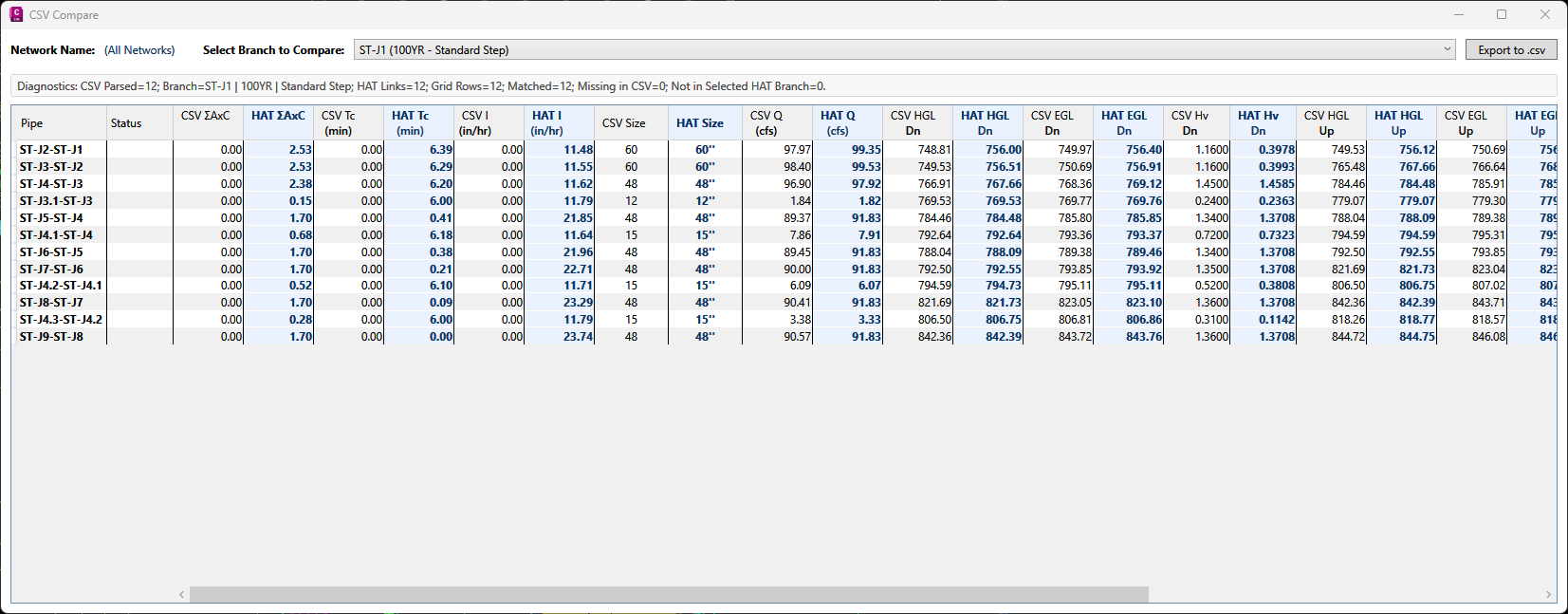
The information shown in the compare window can be exported to .csv file for further analysis.
Please contact support@civilfx.net if you believe you have found a bug in the calculations. Provide as much information as feasible in pdf, excel, txt, .md, word, or other commonly supported email formats, and if possible a .dwg file. Please do NOT send any proprietary or personal information.
Copyright © 2026 CivilFX, LLC