Rainfall Data - IDF | Send comments on this topic |
Input Rainfall Data
To run calculations, Hydraulic Analysis Tool (H.A.T.) needs at least one defined rainfall event. Data can be input in the form of intermediate Intensity Values (see NOAA Hydro-35 technical memo for more information), or by inputting the rainfall curve coefficients directly. The input format and method are very similar to the "Storm Sewers" program as this Hydraulic tool is meant to be a direct replacement. Once Intensity curve coefficients are calculated, the resulting curve(s) may be viewed graphically. See accompanying HAT User Manual for more information.
If intermediate rainfall intensity values are used, H.A.T determines the IDF curve coefficients with non-linear regression methods using the four values provided. You will notice that the coefficients calculated do NOT match those calculated by the Storm Sewers® program. This happens because Storm Sewers attempts the regression methods using only 3 points instead of 4. Due to available computing power and known mathematical methods, it is not necessary to limit the regression model to only 3 points.
It is possible to force the IDF curve to fit the data provided for the 4 intermediate values similar to what is done by C3D® Rainfall Manager:
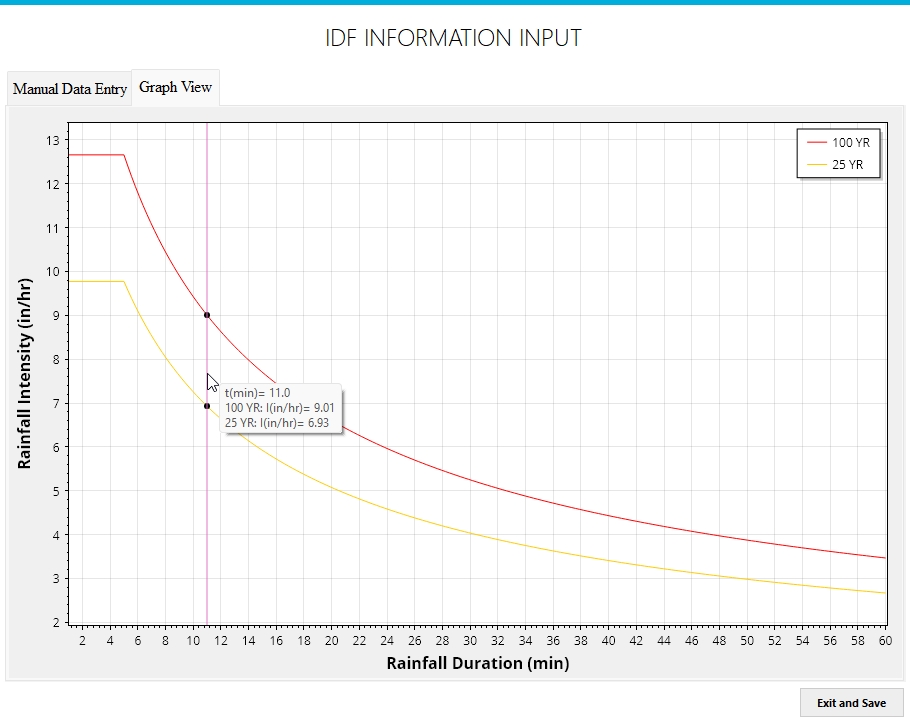
However, the regression model used by H.A.T provides a “smooth” IDF curve that better fits the Power Law Form of the IDF General equation as seen in the screen shots above.
Future improvements to the HAT will include jurisdiction specific IDF curve coefficients or curve equation modifications that could be used in lieu of the general equation or calculated coefficients.
Copyright © 2026 CivilFX, LLC